The menu is visible, the page looks complete, and a tap produces nothing for a moment. Tapping again is a natural response, but it can make the result more confusing when both actions finally run. A page that loads promptly can still respond poorly once someone starts using it.
Interaction to Next Paint, usually shortened to INP, concerns responsiveness around qualifying interactions. It is not a stopwatch for the entire business operation behind a button. A search might provide immediate visual feedback while its results still need a server request. Those are related parts of the experience, but they should not be mistaken for the same measurement.
Describe the action before the number
Write down the page, the control and the sequence leading to the delay. Does it happen on the first menu opening, after several filter changes, or while a large widget initializes? Try the same sequence on a less powerful phone. A desktop browser that finishes a heavy task quickly can hide the pause that another visitor experiences.
Use a performance recording to investigate the relevant interaction, or give that sequence to the person maintaining the site. The browser may be busy with other work before it can process the input. It may then do too much work for the action, or take time to present the updated result. Installing a page cache does not automatically resolve work happening inside the visitor's browser.
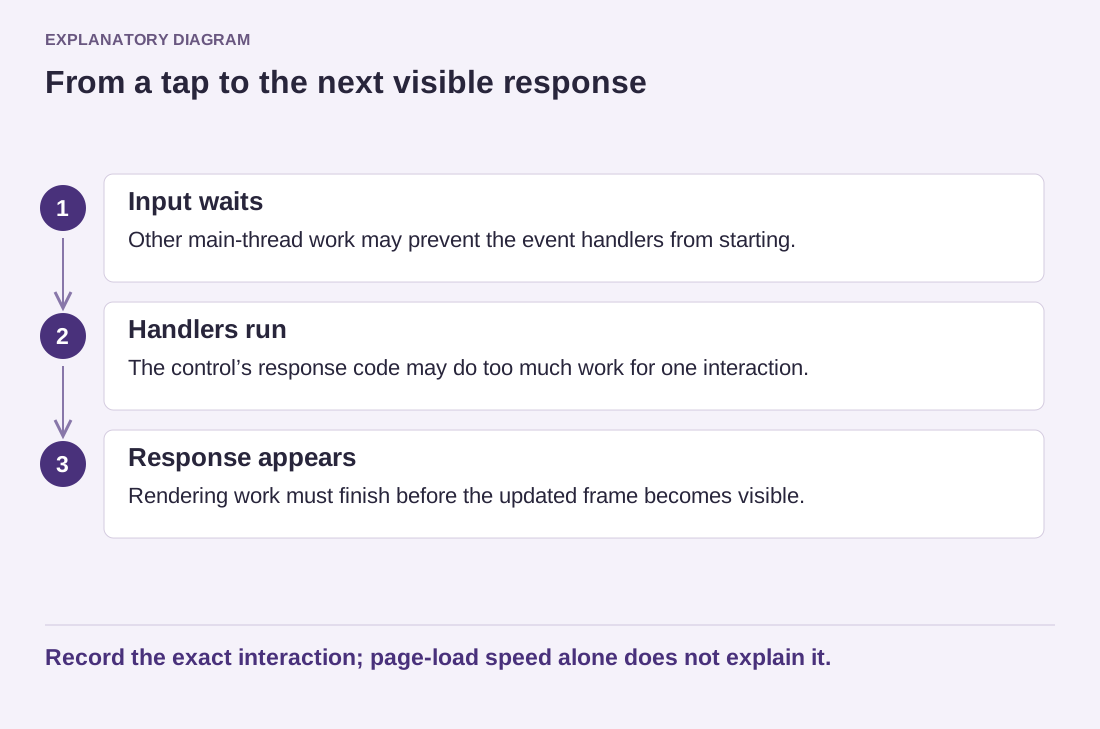
Read the diagram as text
- Input waits: Other main-thread work may prevent the event handlers from starting.
- Handlers run: The control’s response code may do too much work for one interaction.
- Response appears: Rendering work must finish before the updated frame becomes visible.
Record the exact interaction; page-load speed alone does not explain it.
Consider a directory page with hundreds of cards. A filter that rebuilds every card after each keystroke can behave differently from one that searches only after submission or updates a smaller visible set. The appropriate design depends on the task, but the experiment should include typing, clearing the field and using a keyboard—not just clicking once on a powerful machine.
Preserve the feedback readers need
Reducing work must not remove useful states. If an action starts an asynchronous request, show a meaningful pending state and a clear result. Prevent accidental duplicate submissions where necessary, but do not leave the control disabled forever after an error. Faster-looking behavior is not useful if a reader cannot tell whether the request succeeded.
For a WordPress owner, the actionable outcome may be a reproducible report to a theme or plugin developer rather than a code change. Include the exact feature, relevant versions, device and short sequence. Do not attribute every delay to the last plugin installed without testing that hypothesis. A specific slow interaction gives the investigation a manageable boundary.