The installation folder affects the address people will use. Installing WordPress at the domain root commonly gives you a site at example.com. Installing it in a folder named journal commonly puts the site at example.com/journal/. Neither choice is inherently more professional. The useful question is whether the rest of the domain already has a job.
For a new site that will occupy the entire domain, the root is usually the straightforward arrangement. In a hosting installer, a directory field may be optional. Entering wordpress there can create an address you did not intend. Read the proposed destination carefully before proceeding, rather than assuming the installer will choose the root for you.
If an existing application already occupies the root, a subdirectory may be deliberate. A company might keep its main service site in one system and publish a separate journal in WordPress. That arrangement introduces two systems to maintain and two sets of navigation to coordinate. It should solve a real requirement, not merely follow an installer default.
A folder and a subdomain are different choices
A subdomain such as journal.example.com requires its own hosting mapping and DNS arrangement. A folder such as example.com/journal/ is part of the same hostname. Both can host WordPress, but the configuration steps are not interchangeable. Use the instructions for the address structure you actually selected.
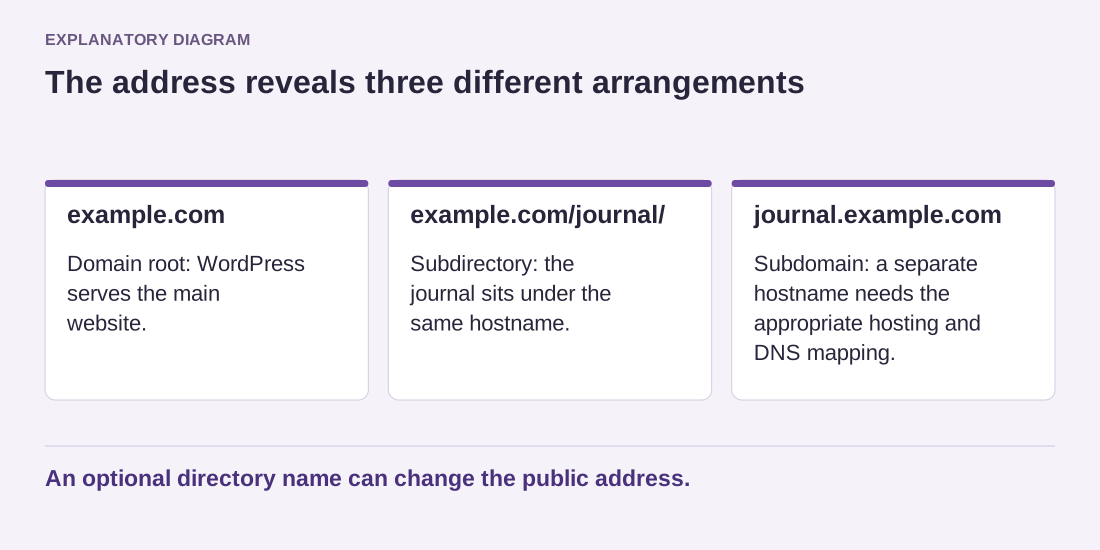
Read the diagram as text
- example.com: Domain root: WordPress serves the main website.
- example.com/journal/: Subdirectory: the journal sits under the same hostname.
- journal.example.com: Subdomain: a separate hostname needs the appropriate hosting and DNS mapping.
An optional directory name can change the public address.
Do not test an installer over an existing site's files. Confirm the destination directory and whether it already contains content. If you are uncertain, ask the provider to identify the document root and explain what the installer will write. A backup is useful, but preventing an unintended overwrite is better than relying on recovery.
WordPress can also run with its software files in a separate directory while the public site uses the root address. That is a supported advanced arrangement, not the same as simply changing the directory field or editing one URL. For a first installation, keep the structure easy to understand. Write down the public address, the installation location and the login address once the installation succeeds.