A theme preview cannot tell you what your website needs to say. Before choosing a layout, list the questions a visitor brings. For a repair business, those might be whether a particular item is serviced, which area is covered and how to request an estimate. Those questions are a better starting point than copying another site's menu.
Write one card for each proposed page. Give it a purpose, a likely visitor and a next step. A services page might help someone identify the right type of work and then lead to a contact method. If two cards have the same purpose and almost the same content, they may belong together rather than becoming thin separate pages.
You can test the map without building anything. Give someone a realistic question, such as whether a workshop accepts beginners, and ask which page name they would choose. Do not explain the labels first. If they consistently choose the wrong destination, the map needs clearer wording or grouping. This is a small editorial exercise rather than a formal user study, but it can reveal assumptions the owner no longer notices. Keep the useful observation—where the route became unclear—instead of interpreting one person’s preference as a universal design rule.
Distinguish stable information from ongoing publishing. Opening hours and service descriptions usually belong on pages. News, case notes and educational articles may work better as posts. This is an organizational decision, not a statement that pages can never change or that posts must be written every week.
Draw the route, not just the hierarchy
Connect the cards with the links a reader would reasonably need. A visitor arriving directly at a service page should not have to return to the homepage to find contact details. Likewise, an introductory article can point to a related explanation without forcing every subject into the main navigation. The menu is only one route through the site.
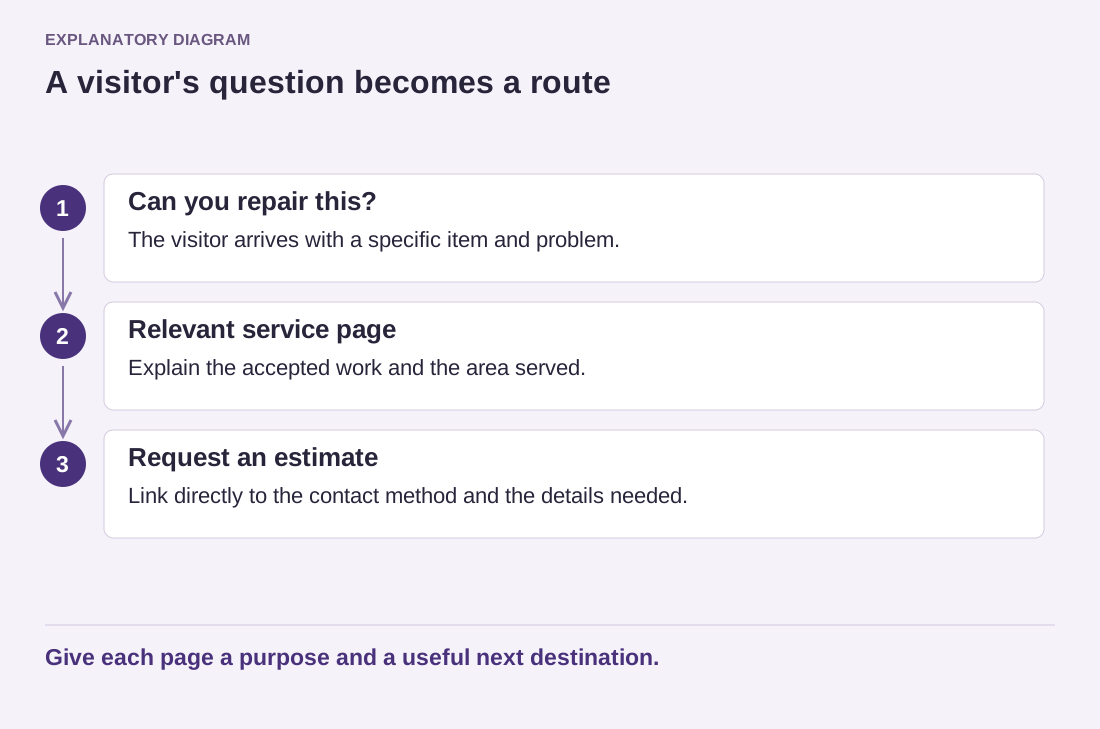
Read the diagram as text
- Can you repair this?: The visitor arrives with a specific item and problem.
- Relevant service page: Explain the accepted work and the area served.
- Request an estimate: Link directly to the contact method and the details needed.
Give each page a purpose and a useful next destination.
Keep the first version modest. A category named Resources is not useful if nobody can explain what belongs in it. A single clear guide can be better than several empty sections waiting for future content. Mark genuinely later ideas separately so they do not become unfinished public pages by accident.
Use this map when evaluating themes. Check whether a candidate can present the content you have, with realistic title lengths and photographs. A design built around a large product catalog may be awkward for a small consulting site. Once you can trace a visitor's path from a relevant page to a useful next action, the theme becomes a way to express that structure rather than a substitute for it.