A homepage and a list of recent posts serve different purposes. The homepage can introduce the site and direct visitors to useful sections, while the blog collects ongoing articles. WordPress can keep these jobs separate. You do not need to squeeze a full introduction above a long stream of posts simply because that was the initial arrangement.
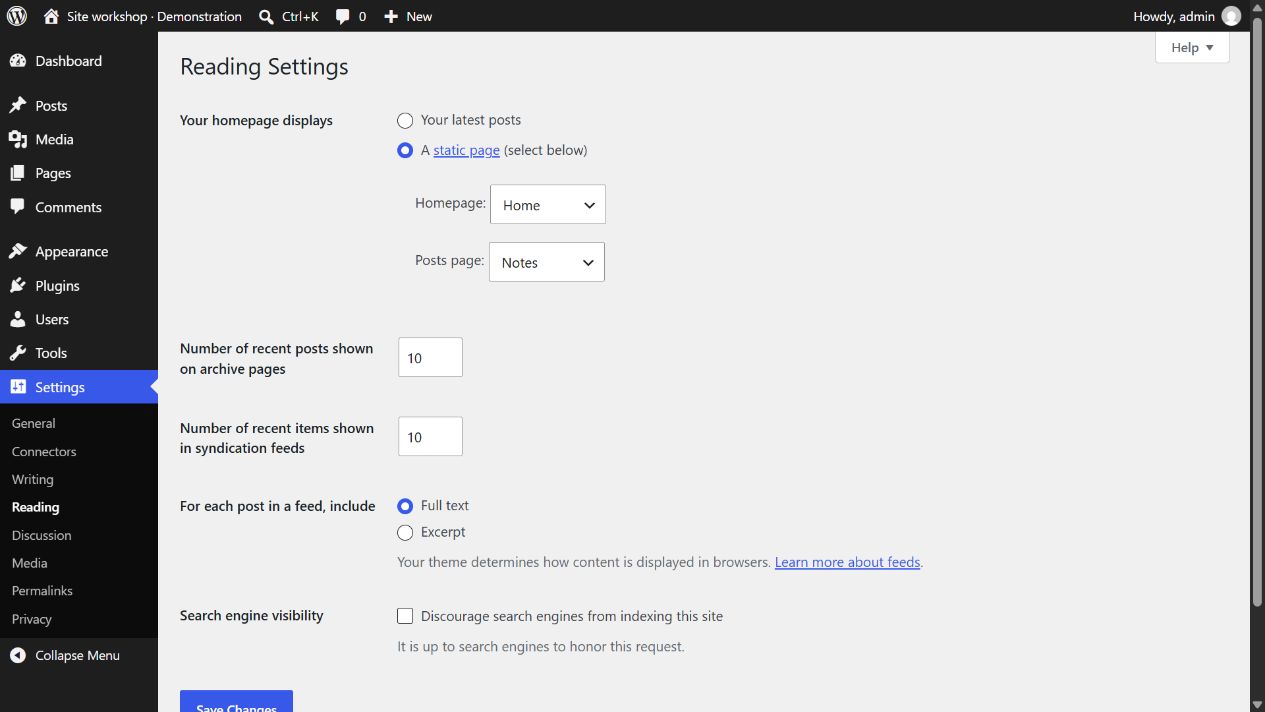
For a conventional static-home setup, create a page for the homepage and another page to represent the posts list. Give them clear names. In Reading settings, choose a static homepage and assign the appropriate pages to the homepage and posts-page fields. The available presentation still depends on the active theme and its templates.
A useful homepage can still include a short selection of recent articles without becoming the official posts page. For example, it might show an introduction, three recent guides and a link to the full collection. That local section and the dedicated blog archive have different scopes. Keep the complete archive accessible, and avoid giving both destinations an identical title if that makes navigation ambiguous. Decide which page a visitor should use to browse older material before polishing the home layout.
The assigned posts page is a special case. WordPress uses it as the location for the automatically generated article list; ordinary content typed into that page's editor may not appear as expected. To change the list layout, inspect the relevant theme template or theme controls. Repeatedly adding paragraphs to the assigned page is not a reliable way to design its archive.
Check the template as well as the setting
Block themes can provide a Front Page template that influences the root homepage. The template hierarchy determines which design is used, so the content you edit and the template you see may be different layers. If the root page does not resemble your page draft, identify the active template before rebuilding the content from scratch.
Add clear links to both destinations where they are useful. Home should lead to the actual root homepage, while Blog or Articles should lead to the posts list. Test the menu on the public site. A page title alone does not guarantee that a navigation item points to the intended address, especially after changing the reading arrangement.
Finally, publish a small amount of representative content and inspect the second page of the article list if one exists. Check that visitors can open an article and return to the collection. The setup is successful when the homepage introduces the project and the archive remains a usable route through its publishing, not merely when two page names appear in the settings.