Blank paragraphs can make a layout look right for a moment, but they are a fragile way to create space. They become objects in the content sequence, respond unpredictably to typography changes and confuse the next person editing the page. Use spacing controls that describe the relationship you actually want instead.
Padding creates room inside a container, between its edge and its content. Margin separates an element from things outside it. A block gap controls spacing between children in a layout. These choices can look similar in one screenshot while behaving differently when text wraps or a section receives a background color.
Suppose a colored notice feels cramped. Padding on the notice's container gives the text breathing room while keeping the color behind that space. Adding blank paragraphs above and below the text imitates the effect but leaves unnecessary content blocks. If the notice needs separation from the next section, adjust that outer relationship separately.
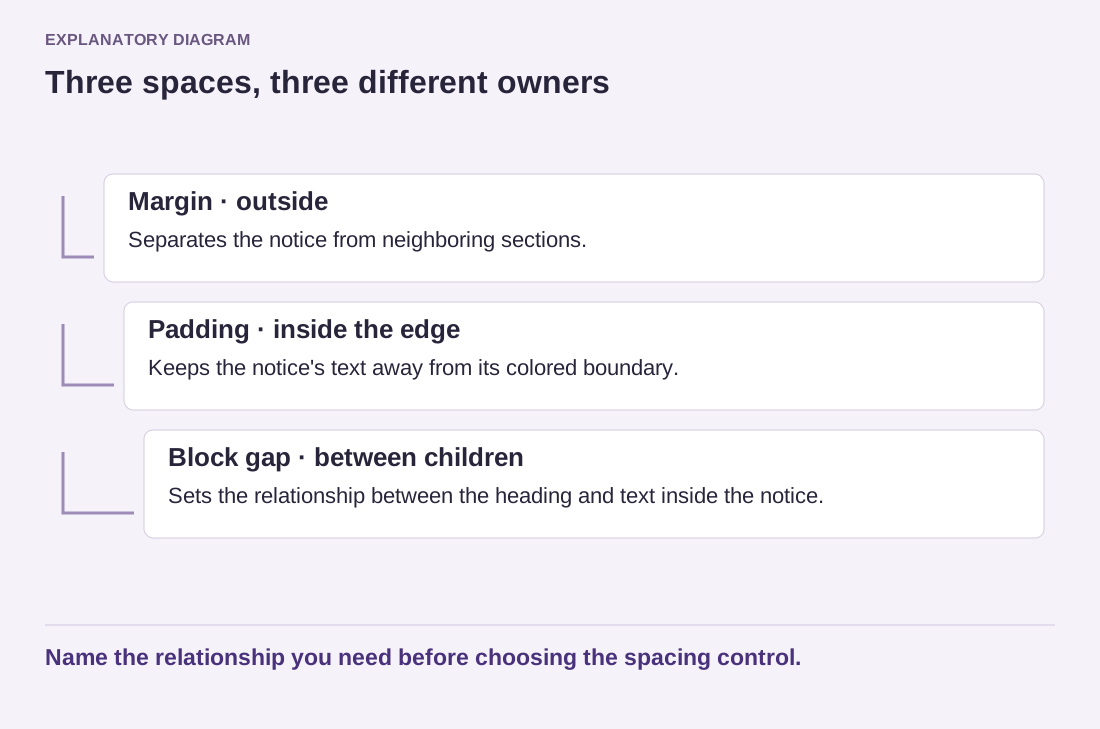
Read the diagram as text
- Margin · outside: Separates the notice from neighboring sections.
- Padding · inside the edge: Keeps the notice's text away from its colored boundary.
- Block gap · between children: Sets the relationship between the heading and text inside the notice.
Name the relationship you need before choosing the spacing control.
The Spacer block can be useful when an intentional standalone interval belongs in a layout. It should not become a substitute for understanding every other spacing control. A long chain of spacers between ordinary paragraphs is difficult to maintain, especially when the same section must work on a narrow screen.
Use the theme's spacing presets when they provide an appropriate rhythm. A small set of repeated distances can make related content feel connected without requiring every gap to be identical. Larger separation can mark a new section; smaller separation can keep a heading close to the paragraph it introduces. Let the content hierarchy guide the scale.
After adjusting, inspect the page with longer text and at mobile width. Large desktop spacing can turn into excessive scrolling, while a tight gap can make separate sections run together. Check the block outline for empty paragraphs left from earlier experiments and remove them only after confirming their role. A clean spacing system is easier to revise because each distance has a clear reason and a clear owner.