A page holds its own content; a template decides how that content is presented within a larger layout. The distinction becomes important when one small edit seems to change several pages. Before moving or deleting blocks, check whether you are editing the page's body or the template that many pages share.
Imagine three service pages with different text but the same header, title position and footer. Their individual descriptions belong to the pages. The surrounding arrangement may come from one template. A paragraph added to that shared template can appear on all three services, even though you intended it for only one. A paragraph added to one page stays with that page unless another shared component is involved.
The address shown in an editor preview is therefore not enough to identify the saved object. Look for the template name, page name and any shared-part indicators together. When asking another person for help, describe both the page being previewed and the editing object. “The Contact page looks wrong while editing the Pages template” gives more useful context than “Contact is broken.” This small habit makes review discussions more precise and helps another editor reproduce the same scope without accidentally making a second, unrelated change.
In a block theme, the Site Editor exposes templates and template parts. The ordinary page editor handles the page's content and may provide a route to edit its assigned template. Because the interfaces look related, it is easy to cross that boundary without noticing. Read the editing context and the save confirmation rather than relying only on the visual canvas.
Follow the content placeholder
A template often contains a Content block that displays the current page or post's body. That block is a placeholder for different content, not a fixed copy of the page you happen to be previewing. Removing it can make the actual page text disappear from the public layout. Replacing it with typed text can make several pages show the same words.
The same principle applies to dynamic blocks such as the post title or featured image. They obtain information from the item being displayed. A Heading block with a manually typed title is different. When reviewing a template, ask whether each visible element is fixed shared material or a placeholder that changes with the current page.
Read the diagram as text
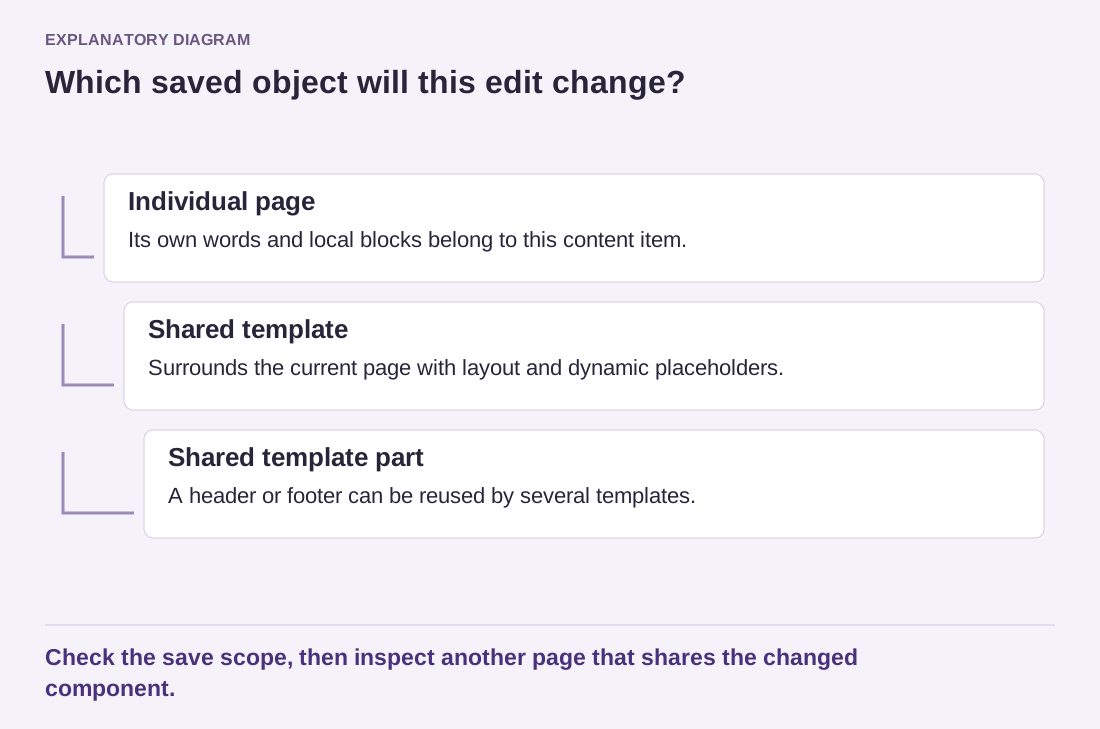
- Individual page: Its own words and local blocks belong to this content item.
- Shared template: Surrounds the current page with layout and dynamic placeholders.
- Shared template part: A header or footer can be reused by several templates.
Check the save scope, then inspect another page that shares the changed component.
For a one-page exception, first consider whether the change belongs in the content itself. A special introduction or a local image usually does. If the entire layout needs to differ, a separate custom template may be appropriate where the theme supports it. Name that template clearly and assign it only to the intended page rather than altering the common template for an isolated need.
Review the reach of the save
Before saving, look at the listed changes. A header template part or a global style change can have a wider reach than the page preview suggests. If you did not intend to alter those components, stop and inspect how they became part of the edit. Do not assume that a screen showing one page limits every change to that page.
Afterward, open the edited page and another page using the same template. This paired check makes unintended shared changes easier to catch. Also inspect a page using a different template if you changed a common header or footer. The test should reflect the component's scope, not just the URL where you began.
Keep a short note of special templates and the pages assigned to them. Without that record, future editors may create several nearly identical templates to solve the same problem. Clear ownership of content and layout makes the site easier to maintain and reduces the fear that every ordinary edit might unexpectedly change the rest of the website.