A heading tells readers what the next section is about. Its level describes the section's place in the document, while its visual size is a design choice. Choosing Heading 4 simply because it looks smaller can produce a confusing outline even when the page appears attractive at first glance.
Start with the page title supplied by the theme. It commonly serves as the main heading, but verify the actual template instead of assuming. An extra title typed into the article body can duplicate that role. Within the body, use headings to mark meaningful sections and lower levels for subsections within those sections.
Imagine an article about preparing a workshop. Space, lighting and storage might be major sections. Wall storage and movable storage could sit beneath Storage. They are not smaller headings because their words are less important; they are subordinate because they describe parts of the same subject. The outline should make sense when read without the paragraphs.
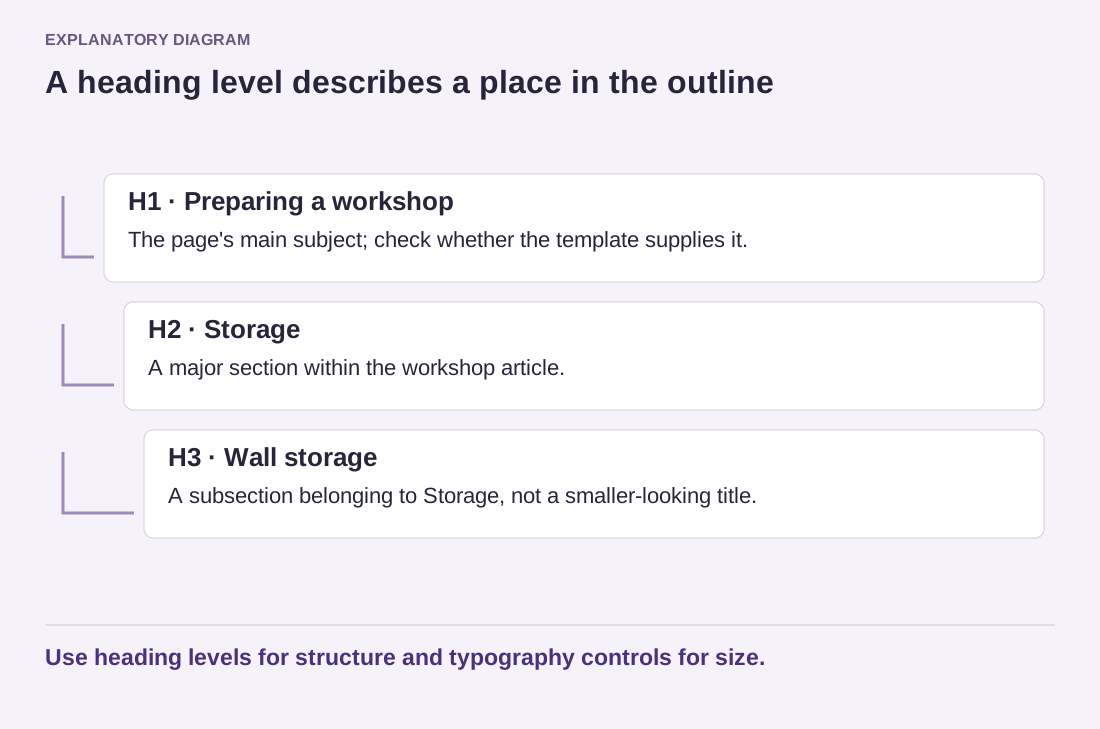
Read the diagram as text
- H1 · Preparing a workshop: The page's main subject; check whether the template supplies it.
- H2 · Storage: A major section within the workshop article.
- H3 · Wall storage: A subsection belonging to Storage, not a smaller-looking title.
Use heading levels for structure and typography controls for size.
Use the editor's document outline where available to inspect that sequence. Look for accidental jumps caused by choosing a style rather than a level. If a heading looks too large, adjust its typography through the supported design controls or the appropriate shared style. Do not solve a visual problem by assigning the wrong structural role.
Write headings that identify the content. A reader scanning several sections benefits more from Check the cable length than from Something to remember. Questions can work when the following section answers them. Avoid making every paragraph into a heading; short articles may need only a few clear divisions, and some need none beyond the title.
Preview the page with a narrow viewport and enlarged text. Long headings should wrap without covering nearby content or forcing horizontal scrolling. Check the outline again after copying material from another editor, because imported formatting can introduce unexpected levels. A useful heading system gives both visual readers and assistive technology a reliable description of the document's organization.