Assigning a parent page creates a relationship in the page hierarchy. It can help organize a large Pages list and influence the child's address. It does not automatically make the child appear beneath the parent in every menu. Page structure and navigation structure are related decisions, but WordPress does not always keep them identical for you.
Imagine a Services page with child pages for repairs and restoration. The child addresses may include the parent slug, making the relationship visible in the URL. That can be a sensible structure when each service has enough content to deserve its own page. It is less useful when the child pages contain only a sentence that could fit comfortably on the parent.
Choose the parent in the page settings available in your editor. The exact panel arrangement can vary. After saving, inspect the public permalink and any menu links that should point to the page. Do not infer the final address from the title alone, especially if the page has an existing custom slug.
Hierarchy is not a promise of a dropdown
A navigation menu can be maintained separately, particularly when you use a Navigation block or a classic theme's menu editor. Add or arrange the links deliberately. An automatic page list may behave differently from a manually curated menu, so identify which type your header uses before expecting a new child page to appear.
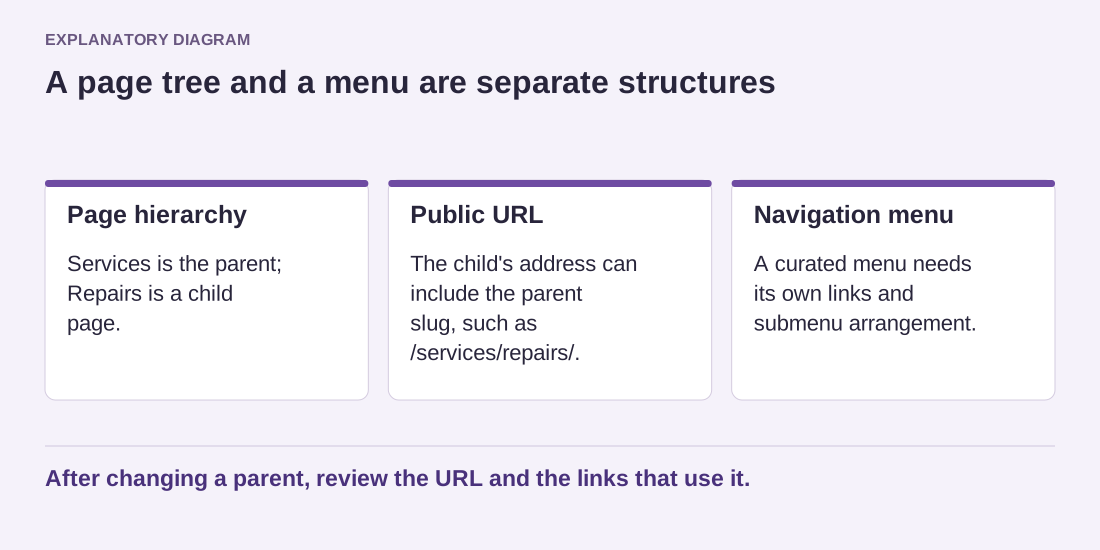
Read the diagram as text
- Page hierarchy: Services is the parent; Repairs is a child page.
- Public URL: The child's address can include the parent slug, such as /services/repairs/.
- Navigation menu: A curated menu needs its own links and submenu arrangement.
After changing a parent, review the URL and the links that use it.
Keep the depth manageable. A visitor should not need to pass through several empty intermediary pages to reach useful information. A parent page ought to explain the group, provide relevant context or offer a clear route to its children. If it has no purpose beyond creating a level, reconsider the structure.
Changing a parent after publication can change the child's URL. Before reorganizing established pages, record the old addresses and arrange appropriate redirects where needed. Update internal links and verify the public navigation afterward. A tidy administrative tree is helpful, but protecting the links people already use matters more than making the hierarchy look symmetrical.