Categories give a growing collection of posts recognizable shelves. They work best when a visitor can predict what belongs on each shelf without reading an explanation. Begin with the subjects you actually plan to publish, not a long list copied from a larger website. Empty sections make a small publication look unfinished rather than comprehensive.
Take a cooking journal as an example. Techniques, ingredients and meal planning might describe distinct kinds of help. A category called Interesting Things tells readers little. A category for one individual recipe is usually too narrow. Test the proposed names against several real article ideas before creating them in WordPress.
Try sorting ten planned headlines into the proposed categories. Note the ones that fit nowhere and the ones that seem to fit everywhere. The first group may reveal a missing subject or an article outside the publication’s scope. The second may indicate category names that are too vague. You do not need perfectly equal counts: one subject can naturally support more articles than another. What matters is that the groups remain understandable and that their archives offer a coherent selection rather than a numerical balance.
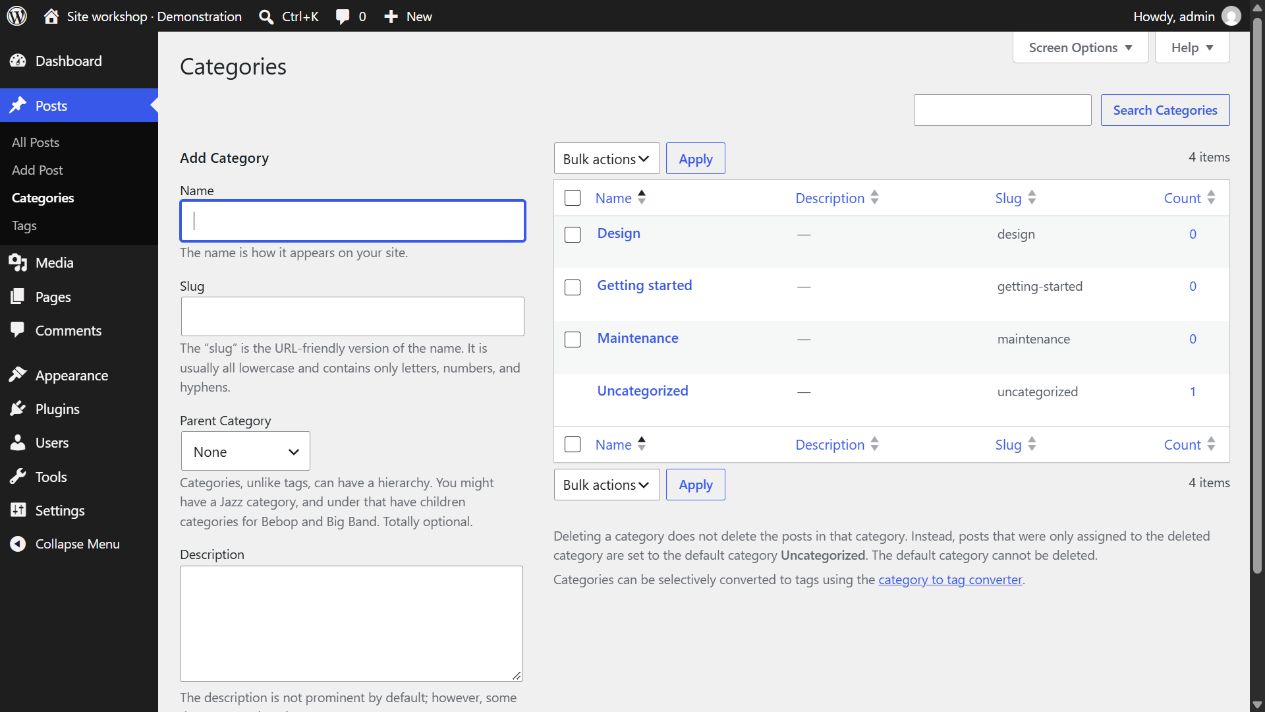
Categories can have parent and child relationships. That does not mean every site needs several levels. A small collection may be easier to browse with a handful of broad categories. Add a child category when it collects a meaningful group and clarifies the route through the material, not simply because the interface permits nesting.
Give the default category a deliberate role
WordPress posts have a category, and an unassigned post uses the configured default. Review that default in the writing settings so forgotten assignments do not quietly accumulate under an irrelevant label. You can change the default to a useful category, but editors still need to choose the right subject for each post.
A post can belong to more than one category. Use that flexibility when the article genuinely serves both collections. Assigning every post everywhere makes the archives indistinguishable. If readers open two categories and see almost identical lists, the classification is not helping them narrow their interests.
After publishing a few posts, visit the public category archives. Check their titles, descriptions where displayed, article links and pagination. The archive is a real reader destination, not just a field in the editor. Add category links to navigation only when they deserve that prominence. As the collection grows, review the structure using the content you actually have; reorganizing established category URLs should be planned rather than done casually.